

Comprehensive Guide · Updated October 2026
How to generate certificates in bulk from Excel: the complete guide
Everything you need to know about preparing Excel and CSV spreadsheets, designing templates, embedding dynamic QR verification codes, and exporting 300 DPI print-ready batches.
A bulk certificate generator is a software tool that produces hundreds or thousands of personalized PDF certificates from a single template and an Excel (.xlsx) or CSV spreadsheet. Instead of editing each certificate by hand, you design the layout once, map your spreadsheet columns to dynamic fields, and generate 100 certificates in about 4 seconds directly in your browser. On paid plans, every certificate also receives a unique dynamic QR code that verifies live at certibulk.com/verify.
How a bulk certificate generator works
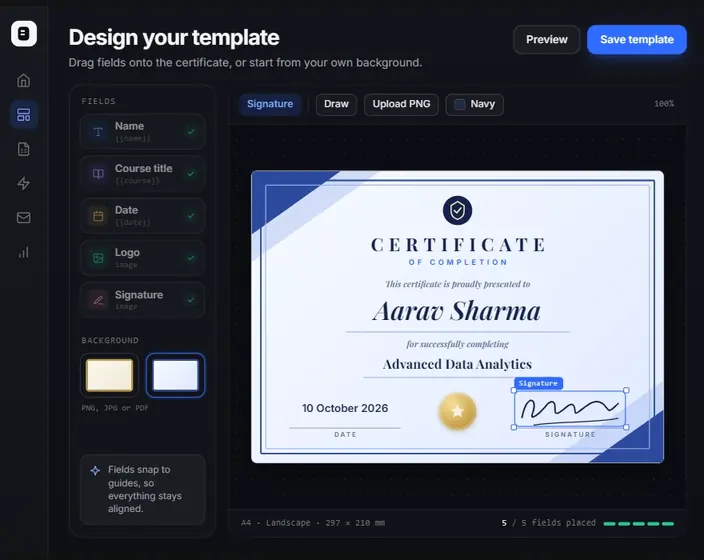
The workflow has three parts. First, the template: you either design one in a drag-and-drop editor, placing name fields, course titles, dates, logos, dynamic QR codes, and signature images, or upload an existing certificate design from Canva or Illustrator as a background and position fields on top of it. Second, the data: you upload an .xlsx or .csvfile with one row per recipient, and map each column to the matching field on the template. Third, generation: one click renders every row into a 300 DPI personalized PDF, which you download as an organized ZIP of individual files or as a single combined print document.
Before committing to a full batch, Certibulk lets you preview the first certificate with real row data so you can catch a misspelled header, an overflowing name, or a wrong date format while it is still cheap to fix.
How to generate certificates in bulk from Excel (step-by-step)
The Excel-to-certificate workflow uses your spreadsheet as the single source of truth: each column header in row 1 becomes a variable on the certificate. Follow these four steps for a clean batch:
- Prepare column headers in row 1: Include clear columns such as
Full Name,Course Title,Issue Date, andRoll Numberwith one recipient per row and no merged cells. - Upload your template background: Use a 300 DPI A4 or Letter PDF/PNG background and place dynamic text boxes with auto-shrink enabled for long names.
- Auto-map Excel columns & QR verification: Upload your
.xlsxor UTF-8.csvsheet. Certibulk matches headers automatically and places a dynamic QR code on paid plans (or a preview-only QR on the 7-day free trial). - Preview and export the batch: Inspect row 1 in the live preview, then generate 100 certificates in about 4 seconds as an organized ZIP of individual PDFs or a single merged PDF.
Comparing bulk certificate tools: Certibulk vs Canva vs Word Mail Merge
When selecting the best bulk certificate generator with QR code verification, compare how each tool handles batch speed, recipient privacy, and credential verification:
| Criterion | Certibulk | Canva Bulk Create | Word / Sheets Mail Merge |
|---|---|---|---|
| Generation speed | 100 certificates in about 4 seconds (client-side) | 15–30 minutes (manual export) | 10–25 minutes + manual PDF splitting |
| Dynamic QR verification | Included on all paid plans via certibulk.com/verify | Static URL QR only (no registry) | Requires complex external macros |
| Spreadsheet privacy | 100% parsed in browser memory; never stored on server | Uploaded to cloud servers | Local Word / Google Cloud add-on |
| Pricing & terms | ₹0 (7-day trial, 50 test certs); ₹499/30d; ₹2,499/6m; ₹4,499/12m | Recurring design subscription | Office license + manual admin time |
Who uses a bulk certificate maker
- Schools and colleges issuing completion, merit and participation certificates to entire batches at the end of a term or program.
- Training academies and consultancies certifying cohorts of learners, where every certificate carries the learner's name, course title and date.
- HR and L&D teams recognizing employees after internal training, onboarding programs and compliance courses.
- Event organizers producing participant, speaker and winner certificates for conferences, hackathons and competitions.
What to look for when choosing one
- Honest one-time pricing in your currency. Prefer flat per-term pricing (Starter ₹499 for 30 days, Pro ₹2,499 for 6 months, Enterprise ₹4,499 for 12 months) over per-certificate credits that penalize volume.
- Unlimited generation on paid plans. Caps and credit packs turn a bulk tool into a metering exercise. Every Certibulk paid plan includes unlimited certificate generation and 24/7 priority support.
- Zero watermark & live QR verification on paid output. The free 7-day trial (50 test certificates, 1 template) includes a watermark and preview-only QR code for testing; paid plans remove all watermarks and activate public QR verification.
- 100% in-browser data privacy. Your recipient spreadsheet should be parsed in browser memory for the session, never stored as a raw database on external servers.
Print-ready output, end to end
Certificates are formal documents, so output quality matters. A bulk certificate generator should render print-ready PDFs that print cleanly at full page size, with your branding and nothing else on the page. Certibulk follows this model: the free 7-day trial carries a watermark and preview QR code so you can evaluate output quality across 50 test certificates, and every paid plan generates watermark-free PDFs with dynamic QR verification and unlimited certificates for the plan term.
Generate your first certificate batch today
Start with a free 7-day trial: 50 test certificates, 1 custom template, no credit card required.